Quick Start: Introduction
The ObjectStorageDataset provides support for tensor-based, out-of-memory datasets for the iterable-style interface. The ObjectStorageDataset class provides a standard PyTorch interface to datasets stored in the CSV format, regardless of whether they are located in public cloud object storage or on your local file system.
The ObjectStorageDataset is not available by default when you install PyTorch, so you need to install it separately in your Python environment using:
pip install osds
and once installed, import the class in your runtime using:
from osds.utils import ObjectStorageDataset
The ObjectStorageDataset class provides a standard PyTorch interface to datasets stored in the CSV format, regardless of whether they are located in public cloud object storage or on your local file system. For every call to the __iter__ method of the class, the result is a PyTorch tensor of the numeric values from the CSV based dataset.
The tensor returned by ObjectStorageDataset must be separated into the label and the features needed to perform an iteration of gradient descent.For example:
object_name = ObjectStorageDataset('./path/')

batch = next(iter(DataLoader(object_name)))
labels, features = batch[:, 0], batch[:, 1:]
Intiate URL File Path
To instantiate the ObjectStorageDataset, you must specify a URL-style path (similar to a Unix glob string) pointing to the location of your CSV-formatted dataset.
Please review the following table for more details.
| path-url | Description |
|---|---|
| file:// | Files residing on the local file system |
| f”s3:// | Amazon-S3 |
| abfs:// | Azure Blob storage |
| f”gcs:// | Google Cloud Storage |
For example, the path url of the file residing on the local storage system intiate from file://. If you have configured the BUCKET_ID and AWS_DEFAULT_REGION environment variables for the S3 bucket containing your cleaned up dataset, you can instantiate the class using:
BUCKET_ID = os.environ['BUCKET_ID']
AWS_DEFAULT_REGION = os.environ['AWS_DEFAULT_REGION']

BATCH_SIZE = 1_048_576 // = 2 ** 20
train_ds = ObjectStorageDataset(f"s3://dc-taxi-{BUCKET_ID}-{AWS_DEFAULT_REGION}/csv_vacuum/part*.csv", batch_size=BATCH_SIZE)
where the train_ds gets assigned an instance of the ObjectStorageDataset. Since the ObjectStorageDataset supports the wildcard character (*), the Python f-string used to create the train_ds instance must specify that the dataset should include all of the objects in S3 matching the /csv_vacuum/part*.csv path in the dc-taxi-${BUCKET_ID}-${AWS_DEFAULT_REGION} S3 bucket.
Batch Size
The batch_size parameter used in the example is required when using ObjectStorageDataset with out-of-memory datasets. By default, the ObjectStorageDataset is designed to instantiate in the shortest amount of time possible in order to start the iterations of gradient descent. In practice, this translates to ObjectStorageDataset caching in-memory and on disk just the dataset objects (typically from object storage) needed to return the just the first batch of examples from the dataset, as illustrated here:
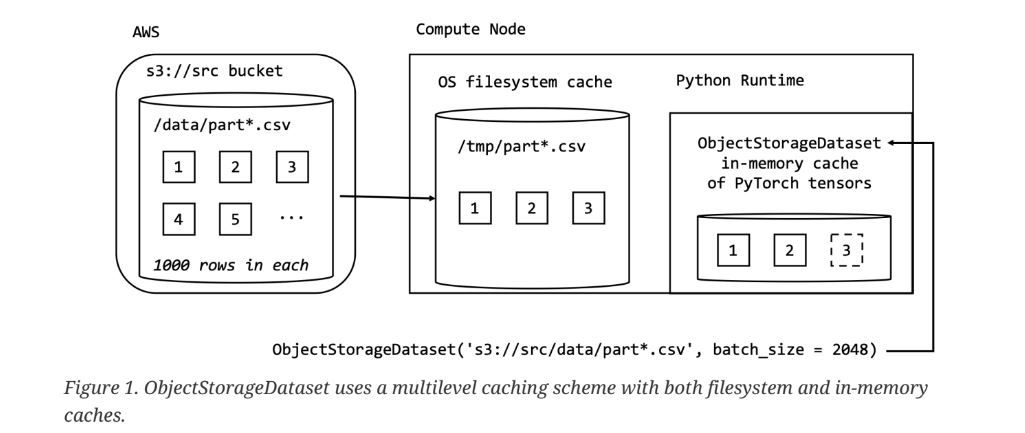
In the example on figure 1.1, ObjectStorageDataset is instantiated using a fictional src S3 bucket containing CSV-formatted objects with a complete URL-style path as s3://src/data/part*.csv. The partitions of the dataset (i.e. the CSV formatted objects with the names matching part*.csv) reside under the data folder in the src bucket. Note that the size (number of rows) of the partitions is entirely independent of the batch_size used to instantiate ObjectStorageDataset, meaning that the batch_size can vary while the size of the partitions stays constant.
In general, the number and the size of the dataset partitions varies depending on the specifics of the machine learning project, although it is better to choose the size of the partitions to be in the range of 100-200MB for efficient transfer over a network connection if you are working with commonly deployed 100Mbps network interfaces.
Eager Load Batches
Although the default, one batch at a time, loading behavior of the :red:`ObjectStorageDataset`class is
useful for reducing the time spent during the instantiation of the class, it can be convenient to pre- download the entire dataset to the local filesystem cache before starting to process it. To control the default behavior, you can use the eager_load_batches named parameter when instantiating the ObjectStorageDataset. For example when using:
train_ds = ObjectStorageDataset(f"s3://dc-taxi-${BUCKET_ID}-${AWS_DEFAULT_REGION}/test/part*.csv", eager_load_batches=True)
All of the dataset partitions located in the S3 bucket are downloaded to the filesystem cache before the __init__ method of the ObjectStorageDataset returns.
Data Type
By default, ObjectStorageDataset uses the widest available PyTorch data type to store the data in- memory. Although this approach serves to avoid loss in number precision when converting data
from CSV format to in-memory cache, it is memory-consuming. For example, if you attempt to fetch a batch of data using the default settings:
train_ds = ObjectStorageDataset(f"s3://dc-taxi-${BUCKET_ID}-${AWS_DEFAULT_REGION}/test/part*.csv", batch_size=BATCH_SIZE)

batch = next(iter(DataLoader(train_ds)))
assert batch.dtype == pt.float64
the assertion succeeds on 64 bit CPUs since pt.float64 is the widest available PyTorch data type for this CPU architecture. Similarly, any integer values in the CSV dataset are loaded as pt.int64 by default.
To override the default loading behavior and reduce the amount of memory used per batch of data, you can specify the PyTorch data type for ObjectStorageDataset to use on column by column basis as shown here:
train_ds = ObjectStorageDataset(f"s3://dc-taxi-{BUCKET_ID}-{AWS_DEFAULT_REGION}/csv_vacuum/part*.csv",
                                batch_size=BATCH_SIZE,
                                dtype={'fareamount': 'float16',
                                'origin_block_latitude': 'float16',
                                'origin_block_longitude':'float16',
                                'destination_block_latitude':'float16',
                                'destination_block_longitude':'float16'})
In the cases where all the columns in the dataset use a common dtype, you can use a Python str instead of the dict from the previous example, simplifying this to:
train_ds = ObjectStorageDataset(f"s3://dc-taxi-{BUCKET_ID}-{AWS_DEFAULT_REGION}/csv_vacuum/part*.csv", batch_size=BATCH_SIZE, dtype='float16')